When my home servers ran ESXi, Veeam (the Community edition for the server backups) kept the critical VMs protected, and did that extremely well. It is a product I’ve used at home and the office for almost the same amount of time. When I migrated the servers completely to Proxmox, I suddenly had two different ways to back up my virtual machines. Proxmox VE (PVE) can create complete VM backups by itself, while Proxmox Backup Server provides a much more sophisticated backup system.
I ended up using both.
Not because one is a fallback for the other, or because I couldn’t decide which one I liked better. They serve different purposes in my backup strategy.
Proxmox Backup Server, or PBS, handles my daily VM backups. Periodically I also create traditional full backups directly from Proxmox VE.
There is some duplication there, obviously. But in this case, that’s intentional.
I Started With PVE Backups
Proxmox VE (PVE) can create a complete backup of a virtual machine without requiring Proxmox Backup Server (PBS) at all. That’s what I started with when I first moved my servers from ESXi, and initially I seriously thought about just staying with them.
The result is a compressed backup file containing the VM that can later be restored through Proxmox. It’s simple, it works, and I like having a complete backup sitting there as a file. This was familiar territory for me given my use of Veeam for years: generate a weekly full VM backup to another location and then rsync it offsite.
The downside is that every time I make another one, I’m creating another complete backup.
That’s significant in my environment because my local backup storage isn’t enormous. I’m using a 6TB drive, and Proxmox isn’t the only thing using it. That drive also has to hold Veeam backups of the two Windows machines in my house—my Arcade T3500 and Dodeca. (You can read in more detail in my Cheap Backup Storage With Old Hardware post.)
Full VM backups can eat through that space fairly quickly, and would limit the number I could keep. One or two backups would not protect me well enough.
They also take more time to create.
One of my smaller VMs is PlexServer. Its virtual disk is 60GB. I recently backed up that same VM using both methods just to get a direct comparison.
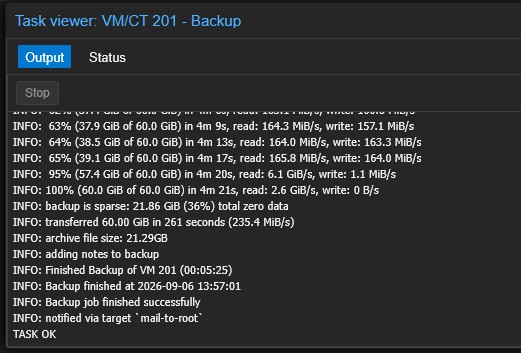
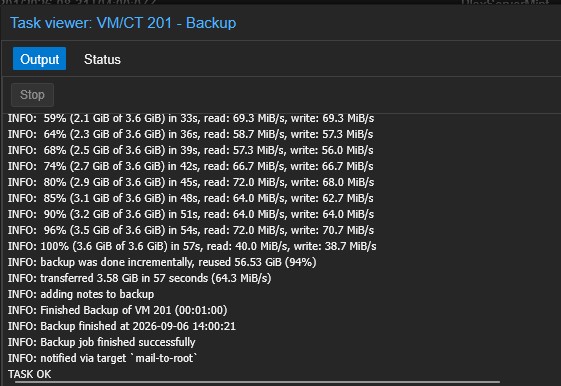
The traditional PVE backup took about five minutes and produced a compressed backup file of just under 22GB. The PBS backup finished in about a minute. For smaller VMs, this is not a big deal but there are a couple that are 200GB+.
Those aren’t directly comparable storage numbers, though. The PVE backup produced a self-contained backup file. PBS works very differently.
And that difference is the reason I use PBS every day.
PBS Is My Daily Backup System
PBS doesn’t simply create another complete compressed VM backup file every night.
Very simply, PBS breaks backup data into chunks and deduplicates them in its datastore. After the initial backup, it only needs to transfer and store chunks that aren’t already present there. Deduplication is something I’d had experience with for many years at my day job; just not at home.
The individual backup snapshots are still complete restore points, but PBS doesn’t have to store another complete copy of all the unchanged data for every backup.
That makes subsequent backups considerably faster and more space-efficient than creating another complete PVE backup file. I can keep 7-10 daily backups of each VM in rotation and not worry about running out of space.
My Home Assistant VM is a good example.
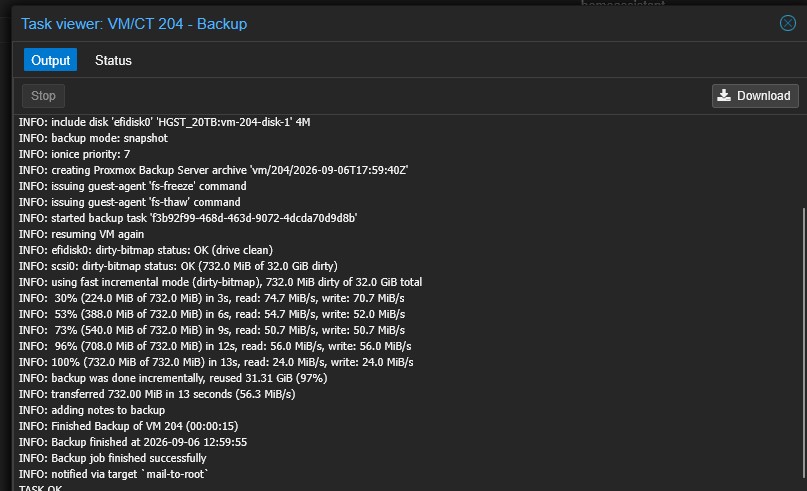
That VM has a 32GB virtual disk. In the backup shown above, PBS transferred only 732MB and completed the backup in 13 seconds.
For something I’m doing every day across multiple VMs, that’s a pretty compelling argument for PBS. It’s fast and doesn’t waste a bunch of storage space.
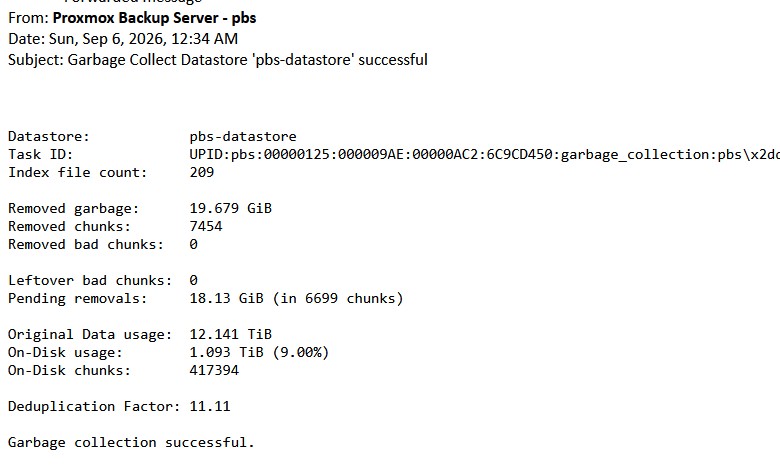
To highlight how much space PBS is saving me on backups, I also get a nightly email after PBS performs its garbage collection. This example shows 12.141TiB of original backup data represented by only 1.093TiB of actual disk usage—a deduplication factor of 11.11. If I were keeping the same number of restore points using full PVE backups, I would need considerably more backup storage than the 6TB I have.
In setting up PBS, I could have installed it on a dedicated physical machine, and there are good reasons for doing that. Dedicated hardware is the preferred arrangement, but I’d already been running Veeam as a VM on one of my ESXi servers and backing those VMs up to external storage for years. I understood the gotchas of running your backup server as a VM.
For my home environment, I decided I was comfortable with that tradeoff. Adding another physical machine just for PBS meant another machine to power, maintain and find a place to physically store. That third concern was as important as the other two to me.
My PBS installation is itself a VM running on one of my Proxmox hosts, and has “just worked.”
So Why Do I Still Make PVE Backups?
If PBS is faster, uses storage much more efficiently and is designed specifically for backing up Proxmox, why am I still making traditional PVE backups?
Because the simplicity of those full backup files is also one of their biggest advantages. A PVE backup is a self-contained file. I can copy that file somewhere else easily.
That’s particularly useful with the backup system I’ve built.
I wrote previously about the old computers I use as inexpensive backup targets. This is really the other side of that story: what I’m actually storing on them.
Periodically, I make full PVE backups and those backup files can then be rsynced to my offsite backup target. Depending on which machine, this might be as often as once or twice a month, or just when I make a major change. For example, I have an FTP Linux machine that acts as the local target for my security cameras (none of the insecure cloud-focused cams in my house). It just forwards the streams to OMV storage. It doesn’t have any important data stored locally; it’s mostly just configuration. So a manual PVE backup is enough for how often that machine is updated.
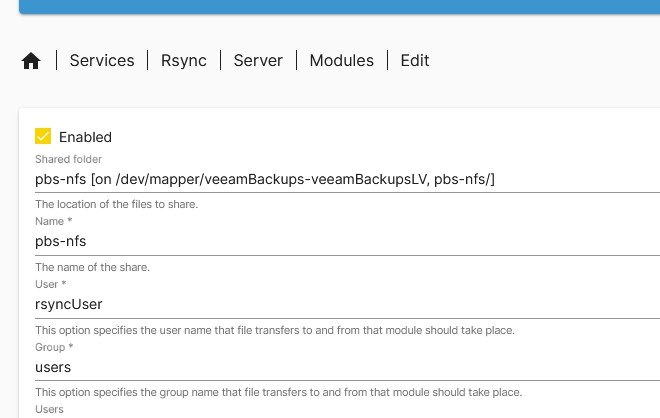
The screenshot above shows the rsync module on my local OMV backup machine. My offsite i5 backup machine connects to it and pulls down the new backup files on a schedule.
I don’t need another PBS server at the other end to store those files. I don’t have to worry about how the PBS datastore is structured. They’re complete VM backup files, and I’m simply making another copy of them somewhere else. PVE works great for that.
If I’m actually dealing with a disaster, having simple backup files sitting somewhere else is one less thing I have to worry about.
PBS Is Different
There is a tradeoff for all that efficiency, though.
With my PVE backups, I can go into the directory and there they are: complete VM backup files. PBS doesn’t work that way. Its datastore contains deduplicated chunks that are shared between backup snapshots. The key word is “deduplicated.”
That’s exactly what makes PBS so efficient, but it also means I’m not going to start grabbing pieces of the PBS datastore with rsync and copying them to my buddy’s house. PBS has its own mechanisms for replicating datastores to another PBS server, but that would mean maintaining another PBS environment at the other end. That’s not what I’ve chosen to do.
For everyday backups, I prefer PBS by a wide margin. For periodically putting complete VM backup files somewhere else—including another physical location—I still really like the great simplicity of the traditional PVE backup.
The two approaches solve slightly different problems for me.
I Even Back Up PBS With PVE
There is one part of this setup that I find amusing. PBS backs up my VMs every day.
And PVE backs up PBS.
Since my PBS server is itself a VM, I periodically create a normal PVE backup of the PBS VM.
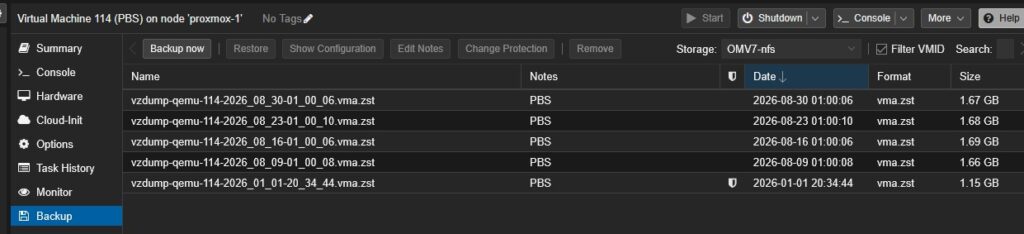
I’m currently keeping four of those backups in rotation. If the PBS VM itself becomes corrupted or I need to move it to another host, I have complete PVE backups available from which I can restore it.
There is an important distinction here, though. Backing up the PBS VM isn’t the same thing as backing up the PBS datastore. The PBS VM contains the server installation and configuration. The actual PBS backup storage lives separately on my OMV backup storage.
Restoring that backup would save me a lot of headaches, though. PBS wasn’t the simplest VM I ever set up. If memory serves, it took me three tries from scratch before I finally had it functioning the way I wanted. If it blows up, I’d much rather restore the VM than figure all of that out again.
Two Paths to the Same Backup Storage
Both types of backups ultimately use storage provided by the same OMV machine I built from an old Dell OptiPlex 7010 and an external drive enclosure.
I just present that storage to Proxmox in two different ways.

One storage path is available to PVE for conventional backup files. The other is the datastore used by PBS. Physically, I’m not maintaining two completely separate local backup servers just to accomplish this.
Of course, having both backup types on the same physical storage device wouldn’t do me much good if that were the end of my backup strategy. That’s one reason the traditional PVE backup files are useful to me: I can easily move copies of them offsite.
Why I Use Both
I don’t really see this as PVE backups versus Proxmox Backup Server, despite the title. PBS is unquestionably the better tool for my daily VM backups. It’s fast, efficient, and allows me to keep considerably more restore points without filling my relatively small backup drive.
But I still like having periodic traditional PVE backups.
They’re complete files. I can see them. I can copy them. I can rsync them to another machine in another location. And if I ever need one, I don’t need the original PBS datastore to restore it.
Could I get by with only PBS? Probably.
But periodic PVE backups don’t cost me much besides some additional storage and backup time, and I like knowing I have complete VM backup files sitting somewhere else. Multiple other places, to be precise.
PBS handles my everyday backups. PVE gives me another recovery option that is simple, portable and easy to understand. Very Veeam-like.
I’m paranoid about backups. Having both makes me sleep a little better and is worth the additional storage.
Leave a Reply