I’ve been using Roku players for years. In fact, Roku is still the streaming device I recommend most often. They just work, and last many years before requiring replacement.
I’m also one of those people who doesn’t connect his smart TVs to the Internet. Ever. That might sound contradictory, but there’s a practical reason for it. A good television can remain useful for many years after its built-in “smart” platform becomes obsolete. Let the TV be a monitor and be fed quality inputs.
I’ve seen that firsthand.
A roughly one-year-old 65-inch Sony TV had developed an annoying Netflix lip-sync problem. Unplugging the TV temporarily fixed it, but only for about a day. I eventually took the Sony off the network and connected a Roku instead.
Roughly four years later, the lip-sync problem has never returned.
At the same house, an older 42-inch LCD television was essentially headed for retirement because its built-in smart-TV platform hadn’t been useful in years. The owner thought the television needed to be replaced, so it sat disconnected in a spare room.
I suggested plugging in a Roku Ultra LT instead. And five years later, that old television is still being used.
My philosophy has become pretty simple:
Buy the television for the display. Let an inexpensive and easily replaceable streaming device handle the “smart” part.
But recently I started wondering about the other side of that arrangement.
What exactly is my Roku talking to?
And perhaps more importantly:
What is it doing when nobody is watching it?
I Wasn’t Trying to Eliminate the Ads
This wasn’t intended to become a giant ad-blocking project.
If I choose to watch an ad-supported service such as The Roku Channel, advertisements are part of the bargain. I’m getting programming without paying a subscription fee.
I’m okay with that.
What interested me was everything surrounding those advertisements—and the traffic occurring when I wasn’t watching ad-supported programming at all.
Could I reduce some of the analytics, audience measurement, tracking and telemetry without interfering with Plex, The Roku Channel, or the advertisements that make free programming possible?
And could I accomplish it without adding another piece of hardware or another network service? This was an important consideration.
Why I Didn’t Install Pi-hole
Pi-hole would be an obvious tool for this job, and it would provide substantially better DNS visibility than what I ultimately used. No question. I’ve toyed with adding a Pi-hole a number of times over the years and have always stopped just short.
For this experiment, I didn’t particularly want to add another device or service to my network just to see what my Roku players were doing.
I already have a TP-Link Archer AX11000 router. Its HomeCare parental-control system lets me create profiles for individual devices, view Internet activity through its Insights feature, and block individual domains.
It isn’t Wireshark.
It isn’t a packet capture.
And, as I eventually discovered, some of the friendly names it displays shouldn’t be taken too literally.
But the Archer was already sitting in my house doing its job, and it gave me enough visibility and control to conduct a useful experiment.
Two Rokus Made This Much More Interesting
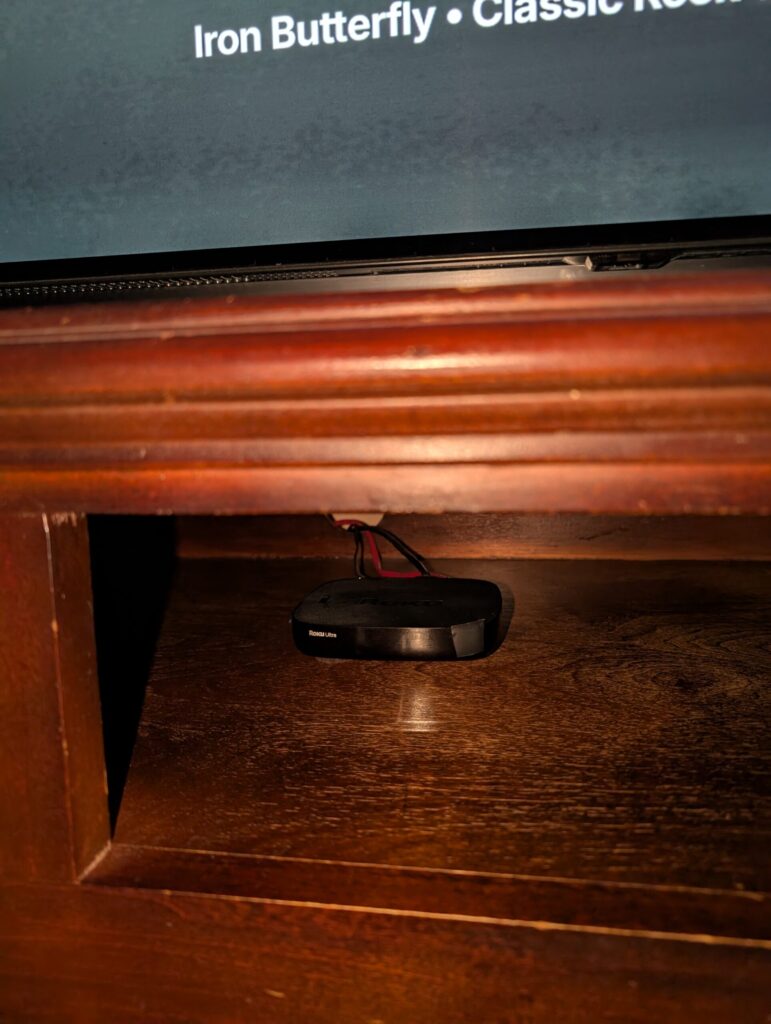
I have two Roku players (right now), so I decided not to modify both of them. Instead, I created separate TP-Link profiles:
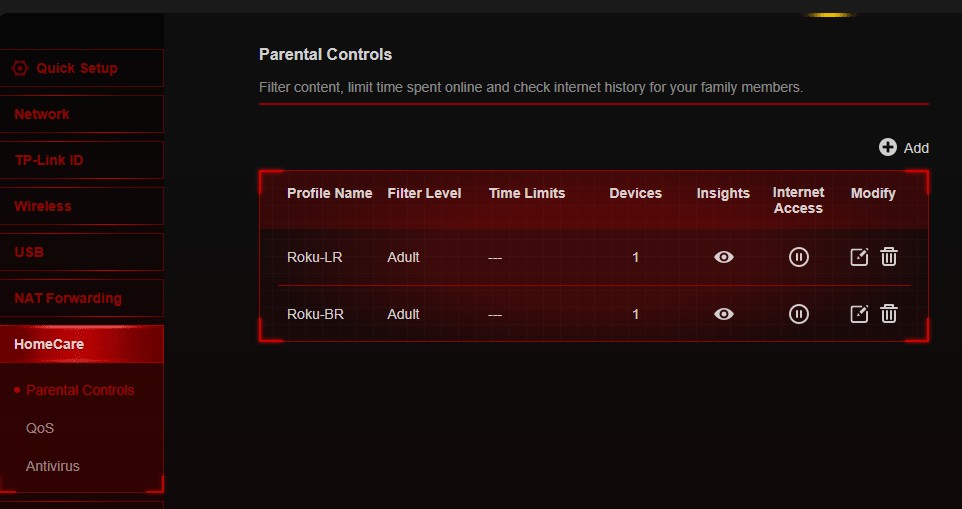
Roku-LR — the living-room Roku. This became the experimental device. It is primarily used for Plex and The Roku Channel, with YouTube added in depending on who was home.
Roku-BR — the bedroom Roku. I left this one completely unfiltered as my control. It is used more for YouTube and less for Plex.
That decision to have one unchanged control and one that had changes applied turned out to be one of the most valuable parts of the experiment. If an unusual domain disappeared from LR after I blocked it but continued appearing on the untouched BR, I had a useful comparison.
Before blocking anything, though, I started collecting baseline data.
Plex Was Talking to More Than Plex
One of my primary uses for Roku in the living room is Plex. Much of what I watch comes from my own Plex server, including movies, TV shows, music and DVR recordings (via Plex DVR being fed OTA channels through the HDHomeRun tuner).
As expected, launching Plex produced connections to Plex infrastructure such as:
metadata.provider.plex.tv
images.plex.tv
pubsub.plex.tv
clients.plex.tv
epg.provider.plex.tv
discover.provider.plex.tv
luma.plex.tv
I also saw PubNub, ClaspWS and plex.direct endpoints.
Nothing particularly surprising there.
One hostname that initially looked more mysterious was:
api.statsig.comThat one now has a good explanation.
Statsig provides experimentation, feature-management and product-analytics tools. More importantly, Plex is a documented Statsig customer. In Statsig’s Plex case study, Plex describes using the service for experiments and major feature releases, with metrics that include things such as minutes spent in Plex and number of playbacks.
So I no longer consider api.statsig.com an unexplained Roku advertising connection. It appears to be part of Plex’s own experimentation/analytics infrastructure.
Other connections were more interesting:
p.ravm.tv
display.ravm.tv
pixel.mtrcs.samba.tv
control.kochava.com
kvinit-prod.api.kochava.com
securepubads.g.doubleclick.net
I also repeatedly saw Roku logging servers:
scribe.logs.roku.com
cooper.logs.roku.com
benjamin-w.logs.roku.com
Seeing a connection doesn’t tell me what information was contained in it.
That’s an important limitation of this entire experiment.
My router can tell me that the Roku contacted a particular Internet destination. It cannot show me the payload and therefore cannot prove that a particular request contained viewing history or other personal information.
But the domains gave me some candidates worth investigating.
Some of Those Domains Really Are Measurement Services
After collecting the data, I researched the domains rather than simply guessing what they did from their names.
One of the best sources turned out to be Roku itself.
Roku publishes a list of third-party services approved for campaign measurement. Roku describes these impression tags as tracking URLs or scripts that can fire when an advertisement is shown and relay information to measurement/reporting providers.
The list includes several companies and domains that appeared during my experiment.
For example:
| What I observed | Roku identifies it with |
|---|---|
pixel.mtrcs.samba.tv | Samba TV |
imrworldwide.com | Nielsen |
track.activemetering.com | Disqo |
doubleclick.net / googlesyndication.com | |
samplicio.us | Samplicio/Lucid |
flashtalking.com | Flashtalking |
ispot.tv | iSpot |
secure.insightexpressai.com | Kantar Millward Brown |
These aren’t classifications from somebody’s blocklist. They’re on Roku’s own list of approved third-party measurement providers.
A Warning About TP-Link Insights
Before going any further, there’s an important caveat about my router. TP-Link Insights sometimes shows an actual fully qualified domain name. Other times it displays a friendly service or application name (such as iCloud).
During this experiment, my Roku history included labels such as:
TikTok
Xbox gaming console
iTunes
iCloud
Bitdefender Services
Nvidia Services
Google Cloud
SoundCloud
That might initially sound alarming, especially given I do not use iTunes nor TikTok.
Then those same sorts of labels appeared on the bedroom Roku when nobody was home and nobody had touched it for more than a day.
Obviously, my untouched Roku wasn’t spending its day using TikTok, iTunes and Xbox.
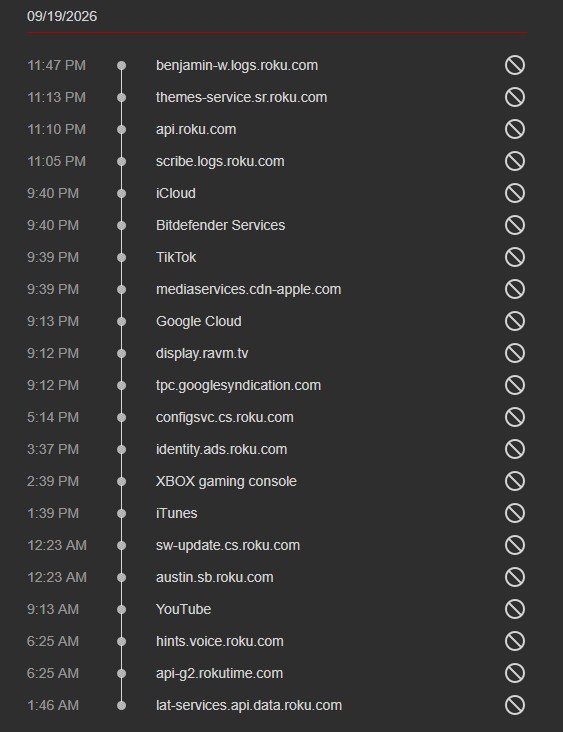
Clearly, I couldn’t take those friendly labels literally, so I established a rule for this experiment:
- An actual FQDN is evidence that the Roku contacted that Internet destination. A friendly TP-Link label is only a clue.
If TP-Link says “TikTok,” I’m not going to write that my Roku contacted TikTok unless I have an actual hostname to support it.
That kept me from drawing conclusions from some pretty questionable TP-Link labels.
I Started With Only Two Blocks
I deliberately avoided copying a giant “Roku blocklist” from somewhere on the Internet. And there are plenty.
If I blocked 100 domains simultaneously and everything continued working, I wouldn’t know which blocks were useful, which did nothing, and which might cause a subtle problem later.
So I started with only:
p.ads.roku.com
analytics.plex.tv
Then I tested Plex.
Browsing worked.
Playback worked.
Resume worked.
Fast-forward worked.
Then I tried The Roku Channel.
It worked too.
So I continued gradually.
Samba TV and Kochava
The next two additions were:
pixel.mtrcs.samba.tv
control.kochava.com
Research after the experiment made the Samba domain particularly easy to classify.
Roku itself identifies pixel.mtrcs.samba.tv as a Samba TV third-party measurement domain in its approved measurement-provider documentation.
Kochava provides attribution and analytics technology. During subsequent testing I discovered that blocking control.kochava.com didn’t make Kochava disappear completely because another endpoint appeared:
kvinit-prod.api.kochava.comEight and a Half Hours of My Own Music
One afternoon I started playing CDs from my own collection through Plex Music at approximately 3:20 PM. It wasn’t intended as a stress test. We had people over and I simply left the music playing. It continued until around midnight. That gave me roughly 8½ hours of real-world Plex use.
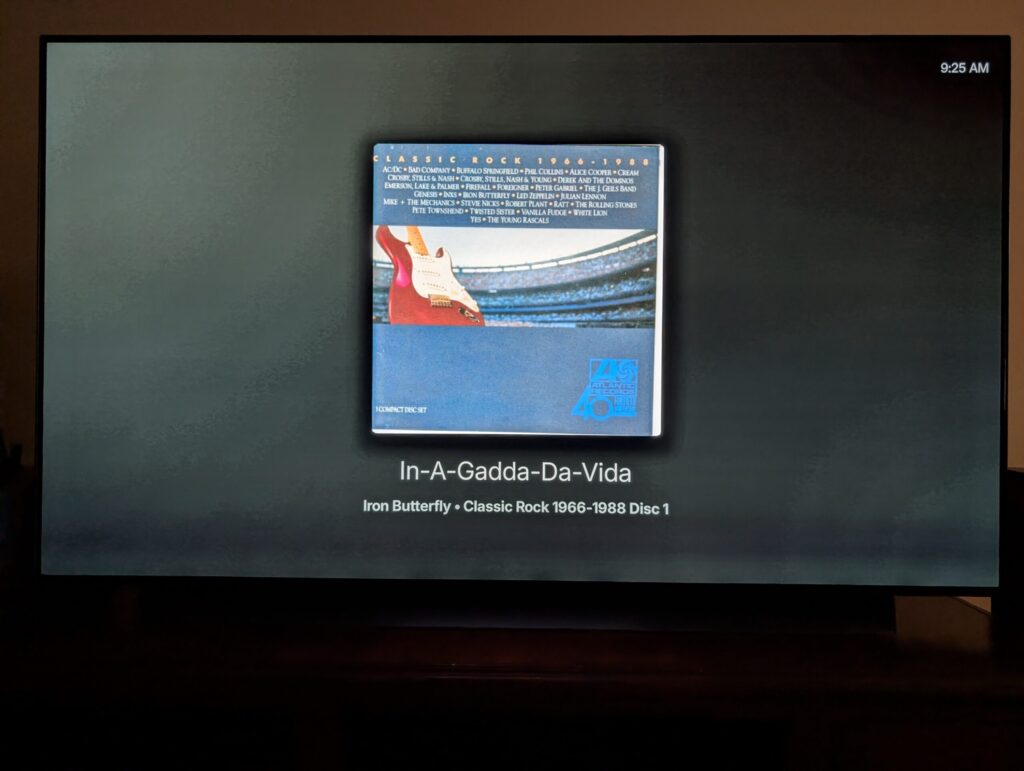
Playback continued normally with the four blocks in place.
During that session, however, the Roku still contacted various Plex and Roku services along with advertising/measurement-related infrastructure. That was important to my original question.
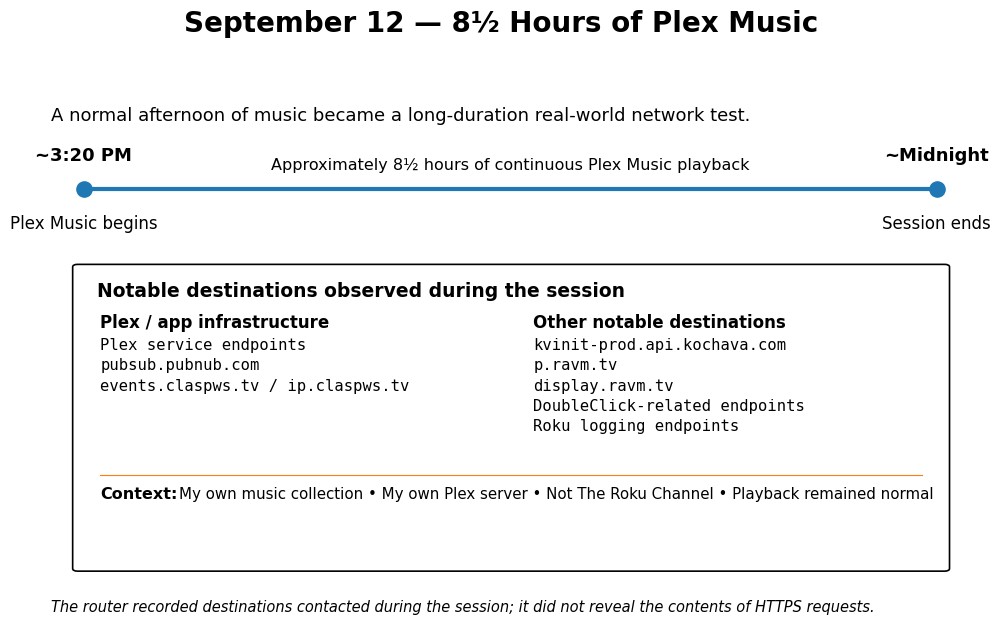
I wasn’t using The Roku Channel.
I wasn’t intentionally consuming an ad-supported Roku service.
I was playing my own music through Plex, directly from a server in my own home.
Then I Watched a Football Game
Another particularly useful test happened while watching a Chicago Bears game through Plex Live TV while Plex DVR recorded it.
More than two hours into the same Plex session, my router recorded a burst containing destinations such as:
p.ravm.tv
display.ravm.tv
securepubads.g.doubleclick.net
track.activemetering.com
cdn.blisspointmedia.com
tracker.samplicio.us
servedby.flashtalking.com
bpm-pixel.pointmediatracker.com
At the time, I was cautious about calling all of those tracking or measurement services merely because the names looked suspicious.
The subsequent research changed that.
Roku’s own advertising documentation identifies track.activemetering.com with Disqo, samplicio.us with Samplicio/Lucid, and flashtalking.com with Flashtalking. Google DoubleClick domains are also on Roku’s approved third-party measurement list.
That doesn’t tell me exactly why those requests occurred during my Plex Live TV session, nor what information was transmitted in each request.
But I can now say with considerably more confidence that several of the destinations I observed are genuine advertising/audience-measurement infrastructure.
Following that test, I added:
kvinit-prod.api.kochava.com
p.ravm.tv
display.ravm.tv
My experimental list had now reached eight domains.
I Still Wanted The Roku Channel Ads to Work
This is where my objective differed from a typical ad-blocking project.
I wasn’t trying to make The Roku Channel ad-free.
I am not a fan of ads; I’ve owned DVRs of some sort since my 2000 TiVo, and happily skip past ads. I time-shift sporting events so I can skip the ads and halftime and cut down the total viewing time. I may not like ads, but if I’m watching something for free on The Roku Channel, I expect there to be ads.
So after blocking RAVM, I deliberately watched The Roku Channel.
The Roku Channel still worked, and, more importantly for this experiment:
The ads worked too.
The Roku used other advertising infrastructure, including:
osm-ads.delivery.roku.com
ads.w55c.net
pagead2.googlesyndication.com
pubads.g.doubleclick.net
I therefore did not start blocking every advertising-related hostname I encountered. That would have defeated the purpose of the experiment. I wanted to see how much unnecessary measurement and telemetry I could eliminate while leaving the actual service functioning as intended.
The Roku Nobody Was Watching
Meanwhile, I was getting some interesting results from the unfiltered bedroom Roku.
There were stretches when nobody touched BR for more than a day. It is almost never used except later at night for bedtime viewing.
It still communicated.
Actual hostnames observed while it sat unused included:
identity.ads.roku.com
display.ravm.tv
tpc.googlesyndication.com
scribe.logs.roku.com
benjamin-w.logs.roku.com
hints.voice.roku.com
lat-services.api.data.roku.com
And then I noticed something particularly interesting about the timing.
On September 18, the untouched Roku contacted:
display.ravm.tv
tpc.googlesyndication.com
at 9:12 PM.
On September 19:
9:12 PM.
On September 20:
9:12 AM.
Nobody was watching it.
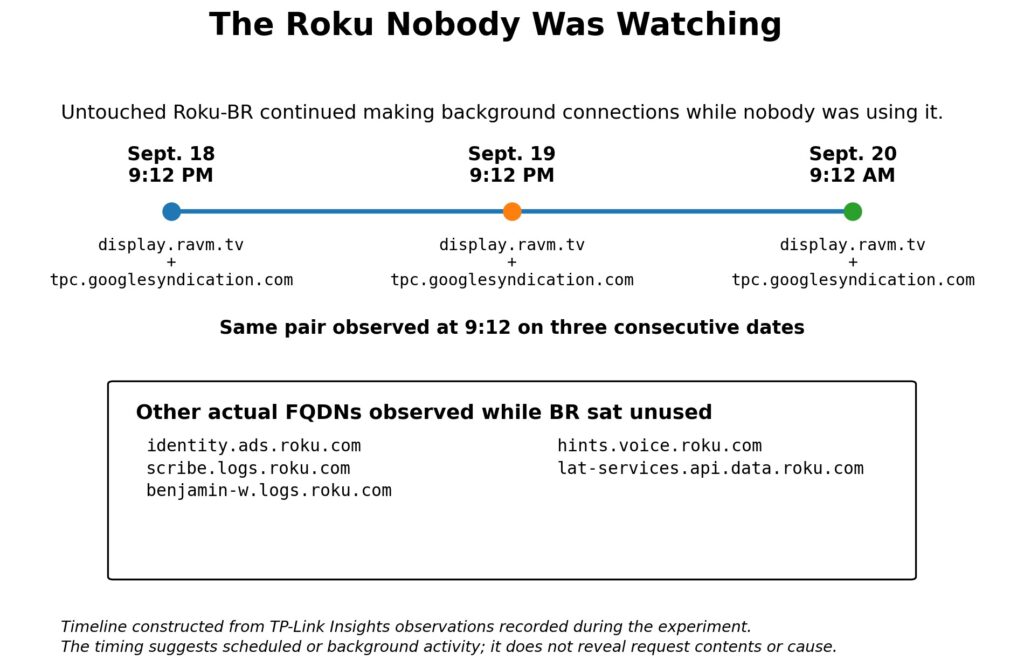
This does not prove those connections transmitted viewing history. It does establish something much simpler: The connections occurred without anyone actively using the Roku.
The regular timing suggests scheduled or background activity, although my router doesn’t provide enough information to determine exactly what caused it.
identity.ads.roku.com Was Also Active While Idle
Another interesting endpoint was:
identity.ads.roku.comIt repeatedly appeared on the untouched bedroom Roku during idle periods.
For example, I saw it at different times on different days while nobody was using BR.
The hostname belongs to Roku and is clearly part of its advertising infrastructure, but I couldn’t find anything that tells me exactly what it’s used for or what information is being sent to it.
So I blocked it on LR while leaving BR alone.
LR continued functioning normally.
BR continued contacting it.
This was another case where having BR untouched paid off.
Blocking Roku’s Logging Servers
Eventually I turned my attention to three persistent Roku logging endpoints:
scribe.logs.roku.com
cooper.logs.roku.com
benjamin-w.logs.roku.com
These appeared over and over on idle devices.
Even while the Roku sat unused, it periodically contacted Roku’s logging servers. That doesn’t necessarily mean new information was being collected at those moments. As a programmer, I’d consider periodic batching a very plausible design: events could be accumulated locally and uploaded on a timer or when a threshold is reached. My router can show when the connection occurred, but not when the information being transmitted was originally generated—or what that information contained.
I added all three to LR’s blocklist, which brought the total to eleven.
Then I waited to see whether something broke—or whether Roku simply switched to a fourth logging server. I expected a backup server would pop up.
Neither happened, though.
I used Plex for TV shows and movies.
I used the Plex DVR to watch recordings.
I played many hours of my CDs with Plex.
I let the Roku sit idle overnight.
The three logging domains disappeared from LR’s history, and I didn’t see an obvious replacement *.logs.roku.com hostname.
Meanwhile, the completely untouched BR continued contacting scribe.logs.roku.com and benjamin-w.logs.roku.com.
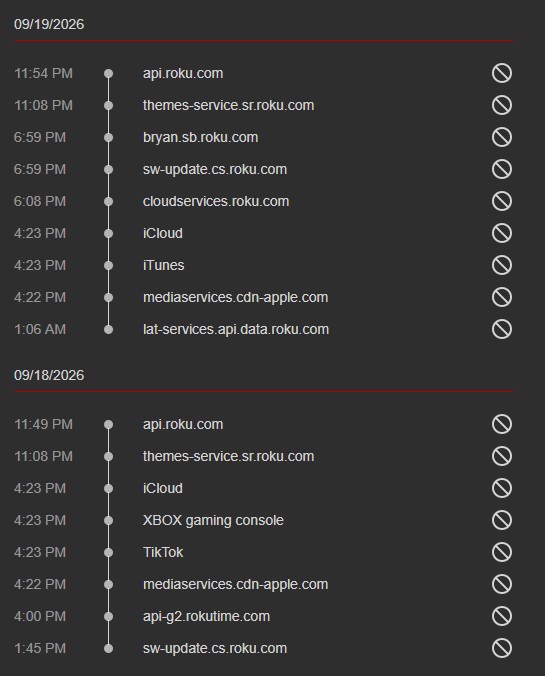
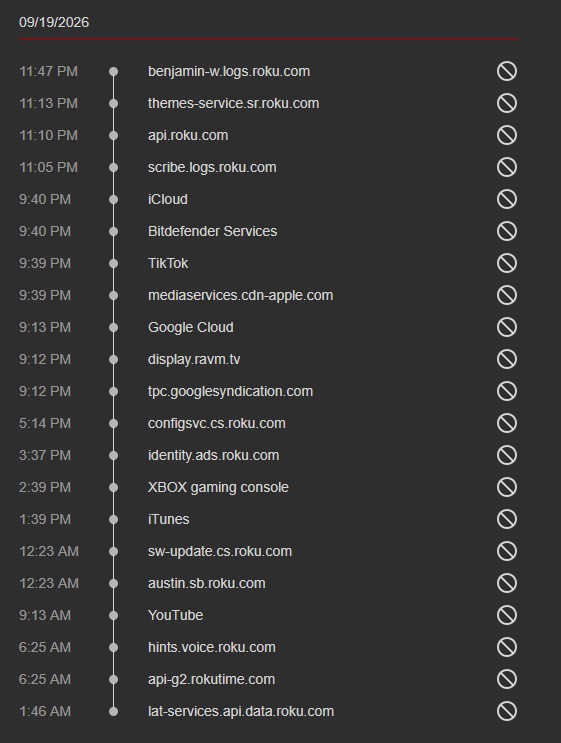
This was a useful comparison. BR continued contacting the logging servers while LR stopped. I still don’t know what information Roku was sending to them, but blocking them didn’t cause any problems that I could find.
What About Voice?
Another recurring idle connection was:
hints.voice.roku.comThis was particularly easy for me to experiment with because I don’t use Roku’s voice functionality. I do not even use their remote. Instead, I use a Roku-enabled universal remote that I can program additional functions into, including the ability to control my Onkyo receivers.
I blocked that voice hostname by itself.
That brought LR to twelve blocked domains.
Then I tested again.
Plex video worked.
Plex DVR worked.
Plex Music worked.
The Roku Channel worked.
Long idle periods caused no apparent problems.
And I didn’t see an obvious substitute voice-related hostname.
The untouched BR, meanwhile, continued contacting hints.voice.roku.com while nobody was using it.
I have no idea what is actually being sent to hints.voice.roku.com, but I certainly can’t say it’s sending voice recordings.
All I know is that it is Roku-controlled voice infrastructure, my unused Roku contacted it while idle, and blocking it caused no apparent problem for someone who doesn’t use voice features. I just feel there is no reason for the Roku to connect to a voice hostname if I do not have voice enabled.
My Current 12-Domain Blocklist
After all of those tests, LR ended up with:
p.ads.roku.com
analytics.plex.tv
pixel.mtrcs.samba.tv
control.kochava.com
identity.ads.roku.com
kvinit-prod.api.kochava.com
p.ravm.tv
display.ravm.tv
scribe.logs.roku.com
cooper.logs.roku.com
benjamin-w.logs.roku.com
hints.voice.roku.com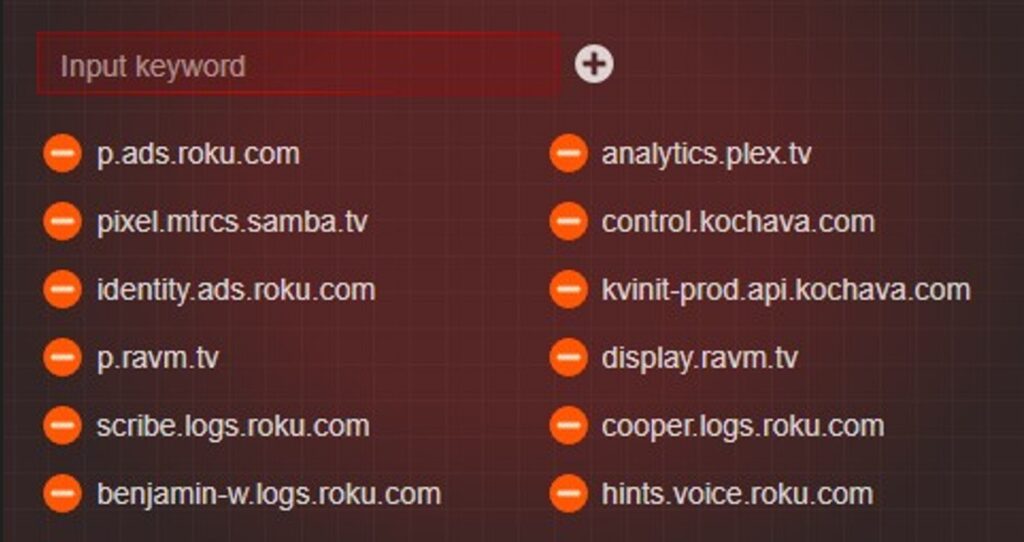
I don’t consider this a universal Roku blocklist.
That’s important.
This is simply the list I ended up with after testing my equipment, my applications and my viewing habits. I added things a few at a time and made sure everything still worked.
I know what some of these domains are used for. Others belong to Roku, but I couldn’t find enough information to say exactly what they’re doing. That’s why I didn’t just block everything that looked suspicious.
If you reproduce this experiment, your results may differ.
Things I Deliberately Didn’t Block
This may be just as important as the blocklist. I repeatedly observed:
lat-services.api.data.roku.comand later:
tis.cti.roku.comBoth appeared on LR.
Both also appeared on the completely unfiltered BR.
That second observation was useful because it ruled out one theory: these weren’t simply fallback hosts Roku began using because I had blocked something else on LR. But I couldn’t establish their purpose well enough to justify blocking them.
So I didn’t.
Similarly, I left Roku’s normal API, configuration, software-update, time, navigation, playback and content infrastructure alone.
The goal was never:
- How few Internet connections can I force a Roku to make?
The goal was:
- How much unnecessary activity can I reasonably eliminate without breaking the device?
I wasn’t trying to make the Roku stop talking. I was trying to make it stop talking when it didn’t need to.
What Roku Says It Collects
At this point I went beyond examining domains and read Roku’s own current privacy documentation.
That provided some important context.
Roku says it receives information about interactions with its services, including browsing and search activity, interactions with content and ads, and application usage. Its current privacy policy says that when streaming services are accessed on a Roku device, Roku may collect information such as which apps are accessed, when they’re accessed, how long they’re used, and information about content selected and streamed.
That distinction becomes particularly important when discussing ACR.
Turning ACR off does not mean that a Roku stops collecting all information about streaming activity.
Roku explicitly says that if ACR is disabled, it will no longer use ACR on the device, but it still receives information about interactions and streaming activities through other methods—including interactions with third-party streaming apps, The Roku Channel, the Roku home screen and Roku-enabled advertising.
That’s worth understanding before assuming that disabling one privacy option makes a Roku invisible.
What Exactly Is Roku ACR?
Automatic Content Recognition was the part I really wanted to test. ACR has become a very hot topic in the second half of 2026, with a lot of press about television manufacturers using it to gather viewing data. I am going to avoid voicing my strong opinions on this subject here.
Roku’s privacy policy provides considerably more detail.
When ACR is enabled on supported devices, Roku says it can collect information about programs, video games, advertisements and channels viewed or accessed, as well as the date, time and duration of that viewing or access.
Roku’s separate ACR service documentation similarly says ACR can recognize programs and commercials and collect information about what and when a user watches.
So this isn’t a case where I need to speculate about what ACR is intended to do.
Roku documents it.
So I Deliberately Turned ACR On
Normally I have ACR disabled, and I make sure it’s disabled on the TVs and Rokus of friends and family I regularly help.
By this point, however, I had collected days of ACR-off behavior from LR and had BR operating as an untouched control. That made it too tempting not to run one more experiment.
On September 20 at approximately 6:18 PM, I photographed LR’s privacy screen showing:
Automatic Content Recognition (ACR): OFF
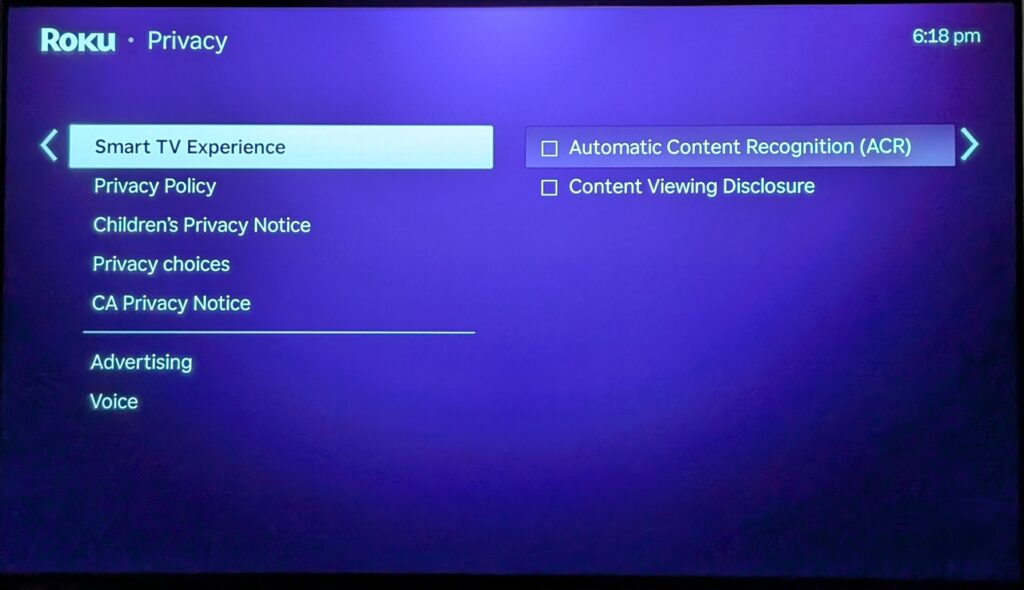
At approximately 6:19 PM, I enabled it and took another photograph. I left Content Viewing Disclosure OFF.
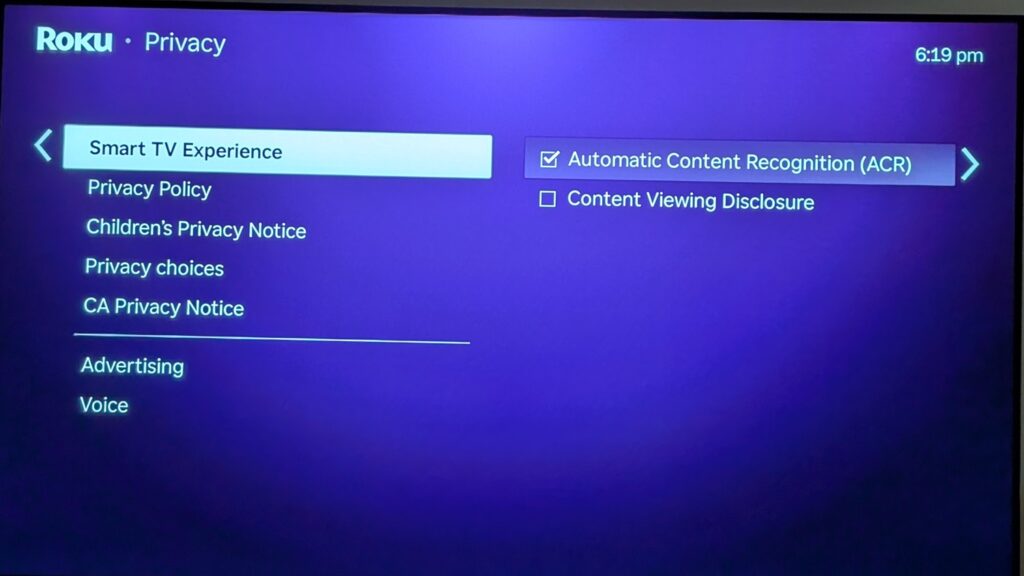
More importantly, I made no changes to my 12-domain blocklist.
For approximately the next two hours I used the Roku normally.
I watched several complete episodes of Shaun the Sheep through Plex—which, incidentally, are awesome.
Then I switched to The Roku Channel.
Then I switched to The Roku Channel before eventually returning to Plex and watching a couple more shows.
I watched one Plex series until approximately 8:05 PM and then switched to another.
At approximately 8:22 PM, I stopped watching and disabled ACR again.
So I had a documented ACR-on window of approximately two hours with everything else held as constant as I reasonably could.
I Expected ACR to Make the Roku Much Noisier
It didn’t.
That’s one of the more surprising results of this experiment. During the ACR-enabled period, I saw the usual Plex infrastructure:
metadata.provider.plex.tv
pubsub.plex.tv
pubsub.pubnub.com
plex.direct
api.statsig.com
During The Roku Channel portion, I saw Roku content and advertising infrastructure:
osm-ads.delivery.roku.com
ads.w55c.net
pagead2.googlesyndication.com
pubads.g.doubleclick.net
When I switched from The Roku Channel back to Plex, the transition was actually very obvious in the history.
The Roku Channel generated a cluster of playback, content, license and bookmark requests:
vod.delivery.roku.com
vod-playlist.sr.roku.com
playback-detail.sr.roku.com
rights-manager.sr.roku.com
wv-license.sr.roku.com
bookmarks.sr.roku.com
Immediately afterward, Plex metadata and PubNub requests appeared.
What I didn’t see was an obvious new ACR-specific hostname. I also didn’t see a sudden explosion in the number of Internet destinations.
There was a TP-Link friendly label for “Nielsen Services” during the test, but because it wasn’t accompanied by an actual Nielsen FQDN, I don’t consider that sufficient evidence to attribute the connection to ACR. Two hours was a very short test, but I was pleasantly surprised that I didn’t see an obvious new connection every eight to ten minutes as each new Shaun episode started.
Does That Mean ACR Didn’t Do Anything?
No.
And this is an important limitation of the experiment.
My test wasn’t simply: ACR OFF versus ACR ON.
It was: ACR OFF + my 12-domain blocklist
versus:
ACR ON + the same 12-domain blocklist.
One or more of those blocked services could conceivably be involved in measurement associated with ACR. ACR could also use Roku infrastructure that serves multiple purposes, making it impossible to identify by hostname alone.
And TP-Link Insights simply doesn’t provide enough network visibility to determine everything a Roku is doing.
So all I can really say from this test is that, with my existing 12-domain blocklist in place, enabling ACR for approximately two hours did not produce an obvious increase in visible network destinations or reveal an identifiable new ACR-specific hostname.
I can’t prove anything beyond that from this test.
Roku’s own documentation—not my router test—is what establishes what ACR itself is capable of collecting.
ACR Off Doesn’t Mean Tracking Off
This was probably the most important thing I learned while researching the results.
It’s tempting to think:
I disabled ACR, therefore Roku isn’t learning anything about what I watch.
Roku’s own privacy policy says otherwise.
Roku says it can receive information about app usage and streaming activity through methods other than ACR, and that disabling ACR doesn’t stop those other methods.
Roku also describes an advertising ecosystem involving advertisers, ad networks and advertising-measurement providers. Its policy says advertising services can be used to understand reach, viewership and advertising effectiveness.
That helps put some of the domains I observed into context.
Again, it doesn’t tell me the payload of any particular connection from my Roku.
But it does establish that advertising measurement isn’t something I’ve inferred merely because a hostname looked suspicious. It’s a documented part of the platform.
What I Actually Accomplished
After all this testing, I didn’t create an “untraceable Roku.” That was never realistic, and it wasn’t my objective. What I did accomplish was considerably more practical.
I started with a Roku that routinely communicated with advertising, measurement and logging infrastructure during both active use and idle periods.
I gradually blocked twelve destinations.
Afterward, the living room Roku still:
- played Plex movies and television;
- played Plex Music for hours at a time;
- played Plex Live TV and DVR recordings;
- browsed Plex normally;
- played The Roku Channel;
- displayed The Roku Channel’s advertisements;
- downloaded normal Roku configuration and software-update information;
- and operated normally through extended idle periods.
At the same time, several connections that had repeatedly appeared before the experiment disappeared. Most importantly, I had an untouched second Roku demonstrating that those services hadn’t simply disappeared globally. BR continued contacting services that LR no longer did.
What Surprised Me Most
I expected to find some tracking hostname I’d never seen before that would become the interesting part of the experiment.
It wasn’t.
The most interesting part was the behavior of the Roku that nobody was using.
Seeing an untouched device repeatedly contact advertising and measurement-related infrastructure—sometimes at almost perfectly repeatable times—was far more informative than seeing advertising domains while somebody was watching The Roku Channel.
The other surprise was that I could block as much as I did without breaking the advertisements themselves.
That’s exactly the distinction I wanted when I began.
I’m not objecting to an ad-supported service showing me an ad.
I’m questioning how much additional measurement, analytics and telemetry needs to accompany that transaction.
Would I Recommend My Exact Blocklist?
Not blindly.
That’s why I haven’t presented this article as:
“THE 12 ROKU DOMAINS EVERYONE MUST BLOCK!!!”
Networks differ. Roku models differ. Apps differ. Features differ.
And I intentionally don’t use certain features, such as Roku voice functionality, that somebody else might depend upon.
Instead, I’d recommend the method I used:
Start by observing.
Separate actual hostnames from your router’s guesses and friendly labels.
Make small changes.
Test after every change.
Leave normal service infrastructure alone unless you have a good reason to block it.
And if possible, keep an unmodified control device.
That last step turned out to be enormously useful.
The Biggest Limitation: This Isn’t a Packet Capture
TP-Link HomeCare gave me enough information to conduct this experiment, but it has substantial limitations.
- I couldn’t inspect encrypted traffic.
- I couldn’t determine what was contained in individual HTTPS requests.
- I couldn’t always determine what process initiated a connection.
- I couldn’t prove that a connection to a measurement provider contained information about the program I happened to be watching.
And TP-Link’s friendly classifications occasionally bordered on comedy when an untouched Roku supposedly spent its day visiting TikTok, Xbox, iTunes, Bitdefender and Nvidia.
Even the timing can be misleading: a connection to a logging server at 6:00 AM could be uploading events collected hours earlier.
A Pi-hole installation, proper DNS logging, firewall logging or packet capture would provide substantially greater visibility. But there’s another way to look at that limitation:
I accomplished all of this with the router I already owned.
No Raspberry Pi.
No new server.
No additional DNS infrastructure.
No new always-on device.
Just the tools already built into my AX11000.
And that was really the point of the experiment.
My Current Roku Blocklist
As of this writing, these are the twelve domains I’m blocking on my living-room Roku:
p.ads.roku.com
analytics.plex.tv
pixel.mtrcs.samba.tv
control.kochava.com
identity.ads.roku.com
kvinit-prod.api.kochava.com
p.ravm.tv
display.ravm.tv
scribe.logs.roku.com
cooper.logs.roku.com
benjamin-w.logs.roku.com
hints.voice.roku.com
I’m continuing to leave the bedroom Roku unfiltered.
I’m also leaving several unexplained or necessary-looking Roku endpoints alone rather than blocking things simply because I don’t recognize them.
So far, that’s been a good balance.
Final Thoughts
I’m still a Roku user and have no plans to stop being one. Despite the slow ramping up of its in-your-face advertising, I still feel it is the best plug-and-play streaming device available if you’re not already in the Apple ecosystem.
And I’m still likely to recommend a Roku to somebody who wants an inexpensive streaming device rather than relying on whatever smart-TV operating system happened to come with their television.
This experiment didn’t change that.
If anything, it reinforced my preference for keeping the display and the streaming platform separate.
After eleven days of testing, I ended up blocking twelve domains.
Plex still works. The Roku Channel still works. The ads in The Roku Channel still work. Software updates still work. Everything I actually use the Roku for still works.
Meanwhile, a fair amount of advertising measurement, analytics, logging and other traffic I don’t need has disappeared.
I don’t know exactly what was being sent to every one of those servers, and I’m sure there is plenty happening that my router can’t show me. But that really wasn’t the point.
I wanted to see how much unnecessary communication I could eliminate without breaking anything.
Twelve blocked domains later, I’m pretty happy with the result.
Leave a Reply