I’ve purchased a lot of hard drives for my home lab over the years, and for quite a while now most of them have had two things in common: they’re enterprise drives, and they’re used.
That combination probably sounds questionable to some people. Why put years-old drives pulled from somebody else’s server into machines holding terabytes of my own data when brand-new consumer drives are readily available?
For me, it comes down to reliability, features, economics, and how I’ve designed the rest of my storage. Used enterprise drives can offer an enormous amount of storage for the money, and I’m comfortable with the fact that drives eventually fail. I use redundancy, keep backups, watch drive health, and replace a drive when it gives me a reason not to trust it.
I didn’t start out with a plan to buy used datacenter hardware, though. I gradually ended up there.
How I Ended Up With HGST
When I was originally given my Dell R710, I purchased four new 4TB HGST NAS drives and ran them in RAID-10. I kept the existing drives, a hodgepodge, in the AMD VMware box as it was the primary server at that point. I had done my research, and HGST drives were showing some very low failure rates in the large-scale reliability data available at the time. One of the most compelling data points for me was Backblaze’s 2016 drive statistics, since I was purchasing these drives in early 2017.
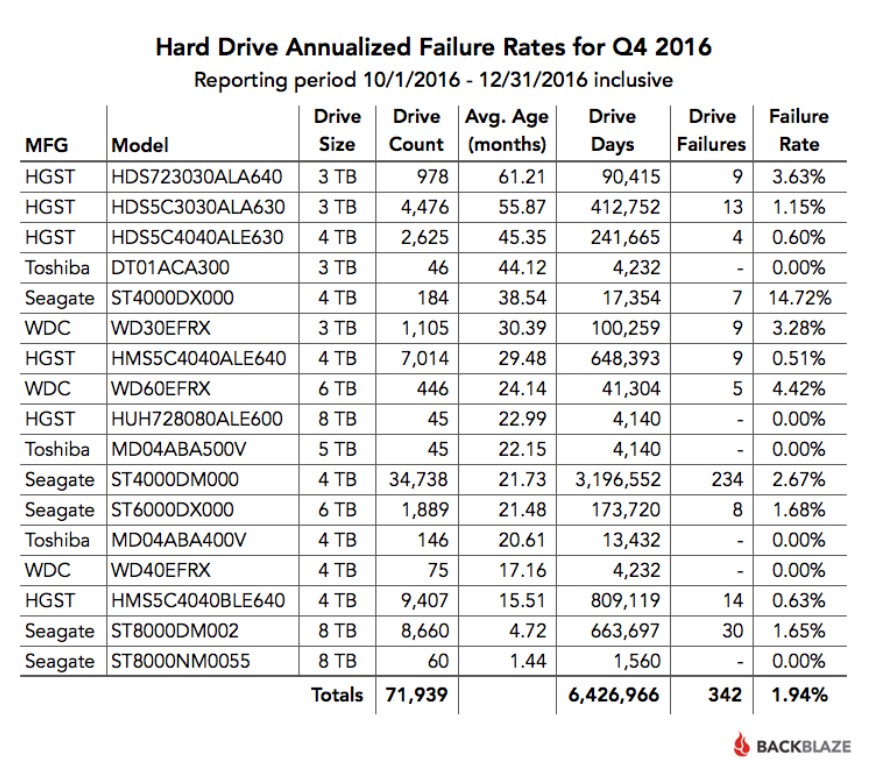
I had good luck with those drives, and as my storage needs grew I started looking at used enterprise HGST drives instead of buying new.
A few friends of mine were building out storage at the same time, so we would sometimes buy drives in quantity and split them among ourselves. That made already-inexpensive used enterprise drives an even better deal. Over the years I’ve bought HGST drives ranging from 4TB to 12TB, in both SAS and SATA versions.
I didn’t choose HGST because I had done some exhaustive comparison and concluded that no other manufacturer could make a reliable hard drive. I kept buying them because my experience with them was good, used enterprise models were readily available at attractive prices, and sticking with a family of drives I already knew made sense.
Eventually it became my default: when I needed more storage or a replacement drive, I looked for a used enterprise HGST first.
The Economics of Used Enterprise Drives
Sometimes buying several at once made the economics pretty compelling.
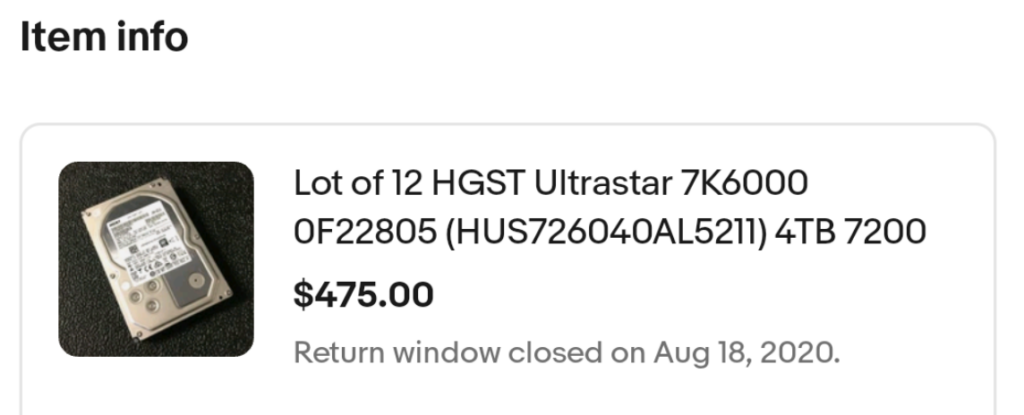
In 2020, we were outfitting a number of servers and still using 4TB drives. We placed multiple orders, with this one being noteworthy: twelve HGST Ultrastars for under $500.
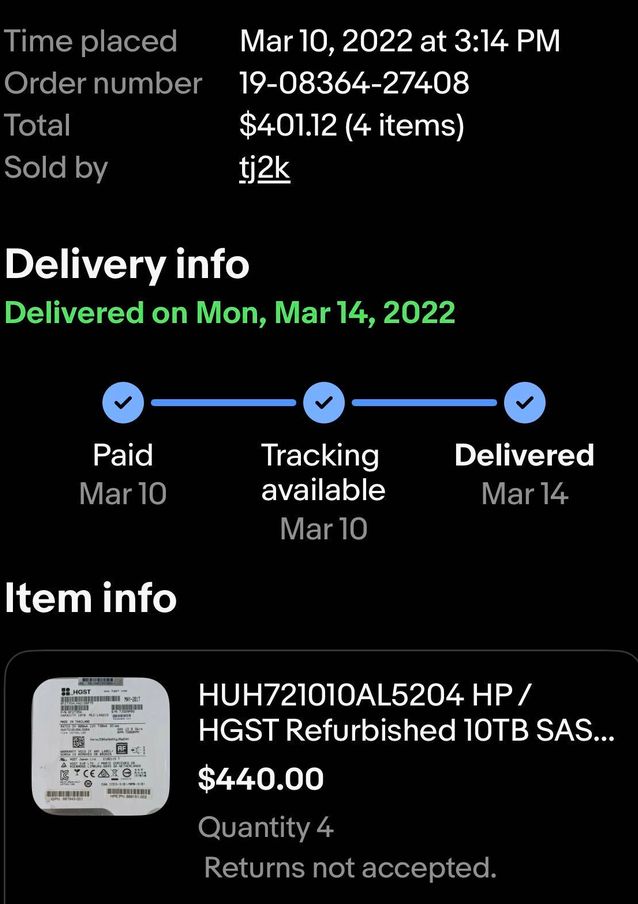
In 2022, for example, we bought four refurbished 10TB HGST SAS drives for $440 — $110 each. Try finding those prices today.
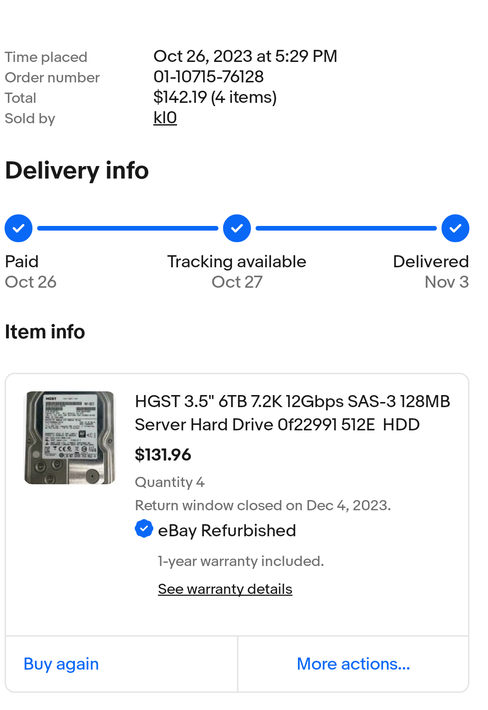
In 2023, we picked up four 6TB HGST SAS drives for $131.96 total, or about $33 each, with a one-year eBay refurbished warranty. New for those same drives were over $180 each.
For what we were doing, used enterprise drives just made too much sense economically to ignore.
As storage needs increased, we’d purchase larger drives. Sometimes in bulk. We grabbed eight 10TB drives for under $700.
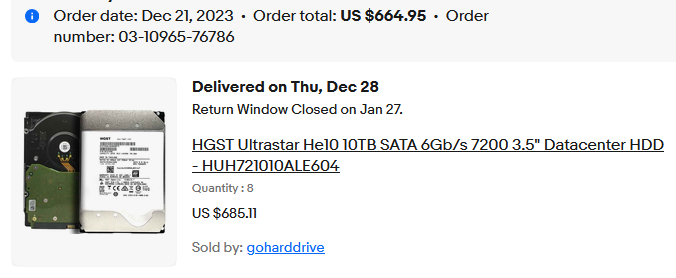
Of course, buying a pile of used hard drives this cheaply only makes sense if you’re comfortable with the fact that some of them are eventually going to fail. I am.
Why Used Doesn’t Scare Me
Buying used hard drives probably sounds risky to some people. I look at it a little differently. I don’t expect any hard drive, new or used, to last forever. Drives are replaceable components, and I build my storage around the assumption that eventually one of them is going to fail.
I don’t trust used drives because I believe they won’t fail. I’m comfortable using them because I’ve built my storage so that when one does fail, it isn’t a disaster.
That’s why redundancy and backups matter much more to me than whether a drive arrived in a factory-sealed box. Most of these drives have been used in RAID arrays, and the data I care about is backed up elsewhere. If a drive fails, I replace it and rebuild the array. It’s an inconvenience, not a catastrophe.
I use mirrors of drives, or RAID-10; never just a single drive in the servers. If one fails, a replacement can be procured and the drive swapped, with no downtime.
For the media pool, I rsync changes to the secondary server’s OMV pool twice a week, so there is an online backup all the time, but with a slight delay in case malware decides to destroy any production data. Having that online copy gives me a lot of flexibility if the primary server needs to be brought down for any length of time. It has also come in handy during a server replacement (“water event”) and the ESXi to Proxmox migration.
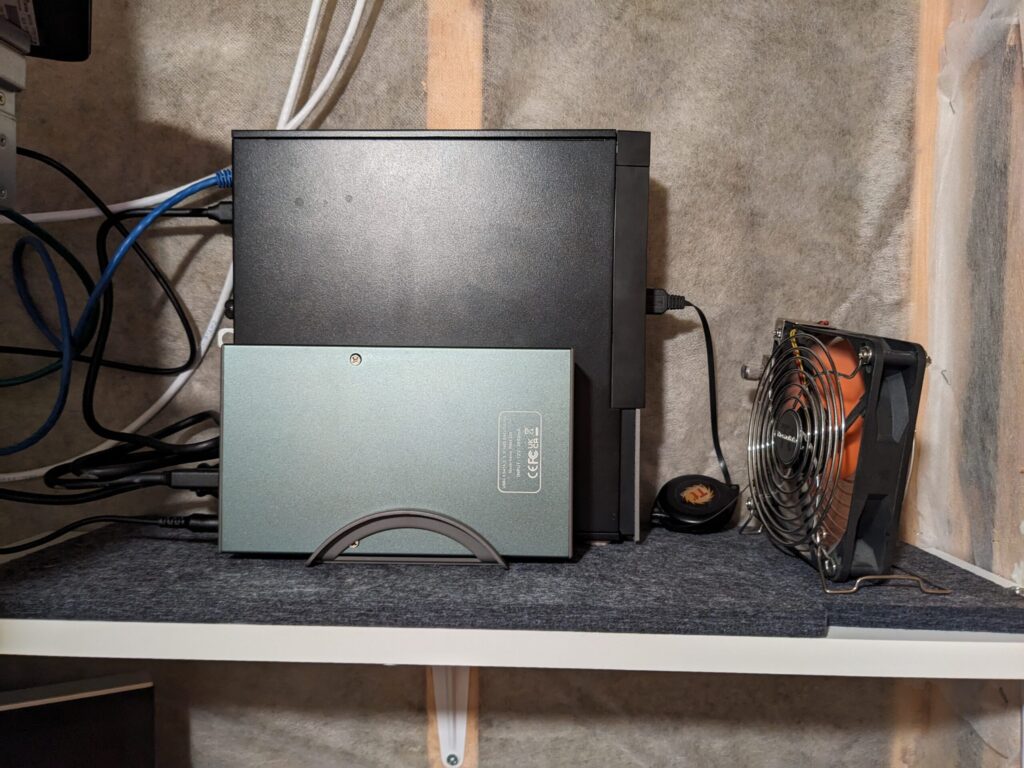
All the VMs except for the media pool are backed up nightly to an old Dell OptiPlex 7010 in the sump “server” closet, with a 6TB HGST drive in an external enclosure. This is done both with PVE native backups for occasional full backups and with nightly backups to the Proxmox Backup Server.
The full VM backups are rsynced to a backup location (also known as a buddy’s server room) to the ancient i5 desktop with two 8TB HGST drives in it as JBOD OMV storage. That same machine also receives the semi-weekly rsyncs of the media pool. This is accomplished thanks to Tailscale and our fiber internet.
Periodically, I also back up the most important data to external drives that are kept in a fireproof safe, as offline backups.
I Care More About Health Than Hours
Buying used enterprise drives also means getting comfortable with high power-on-hour counts. A drive with 30,000, 40,000 or even 50,000 hours doesn’t automatically bother me. I care much more about what the drive is telling me about its actual health. I wrote more about how I monitor drive health with SMART and SmartMon here.
SMART data gives me a way to look beyond the age of the drive. Reallocated sectors, pending sectors, uncorrectable errors and other indicators of trouble matter more to me than the power-on-hour counter by itself. I also pay attention to what the RAID controller is telling me. SMART is useful, but it isn’t infallible.
That 6TB drive attached to the OptiPlex is also a good example of something else I’ve learned from buying used enterprise drives: I don’t automatically consider a drive bad simply because it has a lot of hours on it. As I write this, that drive has accumulated 79,149 power-on hours — a little over nine years of powered-on time.
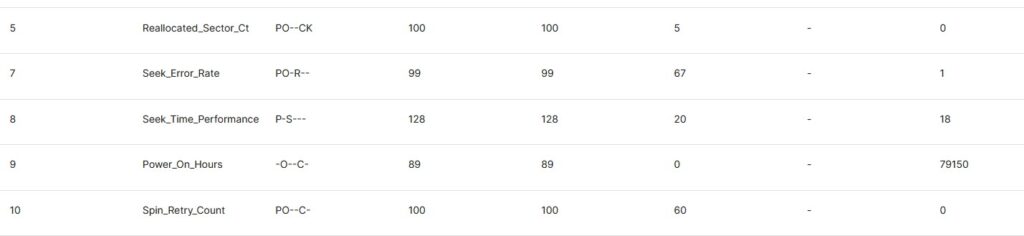

That’s a big number, but the number that interests me more is right above it: zero reallocated sectors. It also has zero pending sectors and zero offline uncorrectable sectors. The drive is old, and I’m certainly aware of that, but I don’t see a reason to retire a functioning drive solely because its hour counter has gotten large.
Here’s another reason I don’t judge an enterprise drive by power-on hours alone. I recently pulled a 4TB HGST from a decommissioned machine with more than 101,000 hours on it — over eleven and a half years of powered-on time. Despite that, it still reports zero reallocated sectors, zero pending sectors and zero offline uncorrectable sectors. Hard Disk Sentinel rates both its health and performance at 100%.
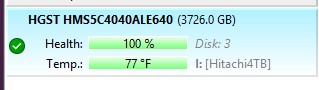
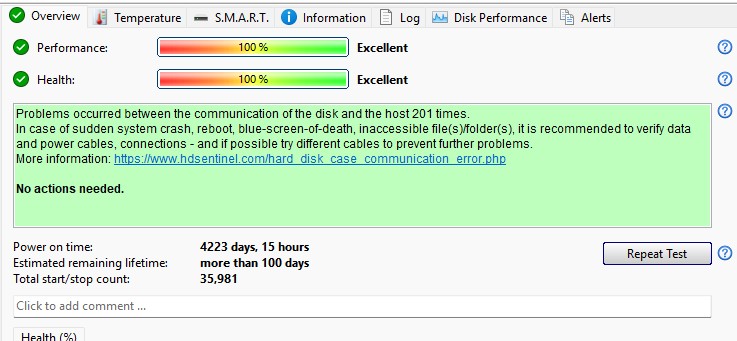
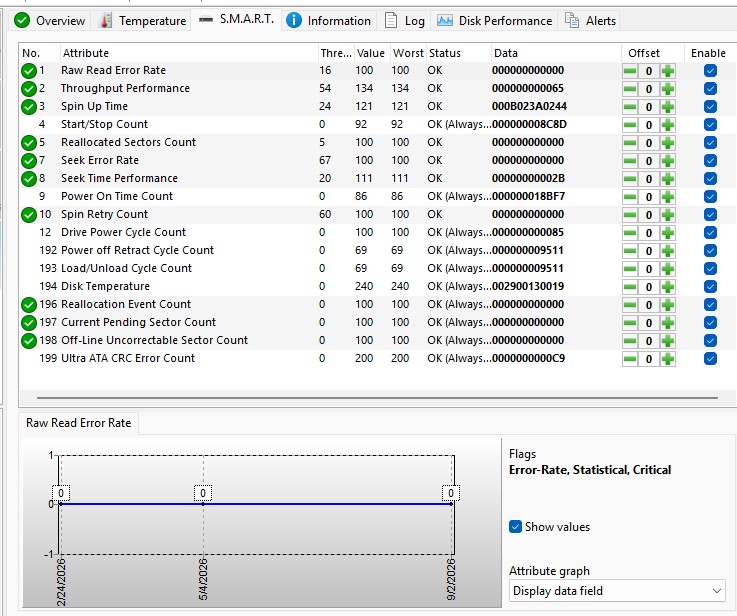
The drive does show 201 historical interface communication errors, but those are different from media errors and may have occurred anywhere in its previous cabling or controller path. After more than 101,000 hours, SMART still shows no signs of media deterioration.
That doesn’t mean I expect another eleven years out of it. It just means that 101,000 hours, by itself, isn’t a reason for me to throw it away. It is currently sitting with a pile of other drives waiting to be dealt with.
High hours don’t get a drive a free pass, either. I recently had a good example of the other side of this. One of the 10TB HGST SAS drives in my R720 had accumulated more than 51,000 power-on hours when the Dell PERC controller flagged it as failing. Interestingly, the drive itself still reported an overall SMART health status of OK.
I could have spent more time trying to determine exactly why the controller no longer trusted it, or tried to force it back into service. But that really isn’t the point of this approach. Once an old drive gives me a reason not to trust it, I replace it. A replacement enterprise HGST was obtained and pressed into service, and the array was rebuilt.
Meanwhile, another 10TB HGST SAS drive in the same server (the other half of the mirror) has more than 41,000 hours and remains in service. I don’t retire drives just because they’re old, but I also don’t try to squeeze every last hour out of one once something gives me a reason not to trust it.
Enterprise SSDs Follow the Same Logic
The same thinking has carried over to SSDs. For a home lab, I don’t necessarily need the newest or fastest SSD available. What I want is a drive that is reliable, has plenty of endurance for the workload, and behaves well in a server.
That’s another area where older enterprise hardware can be attractive. Enterprise SSDs were designed for sustained server workloads and generally came with features that inexpensive consumer drives didn’t always have, such as much higher write endurance and power-loss protection. Once their capacity becomes small by current standards, they can also become surprisingly inexpensive on the used market.
Just as with hard drives, though, I wouldn’t buy one simply because the word “enterprise” is printed on the label. With a used SSD, remaining write endurance is one of the first things I want to see. A heavily used datacenter SSD near the end of its rated life isn’t automatically a bargain just because it was expensive when new.
But when I can buy a used enterprise SSD with most of its endurance still remaining for about the same money as a low-end consumer drive, I’ll generally take the enterprise drive.
Intel S3610 Example
A good example is the pair of 200GB Intel DC S3610 SSDs I use for the mirrored Proxmox boot drives in one of my Dell R720s.
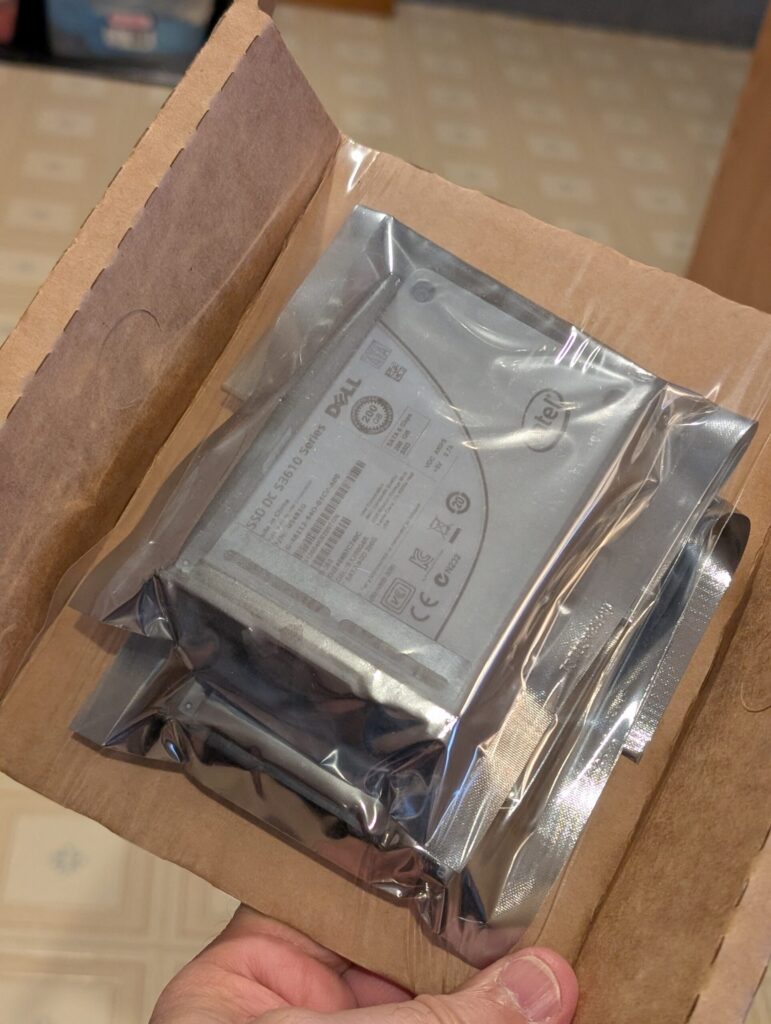
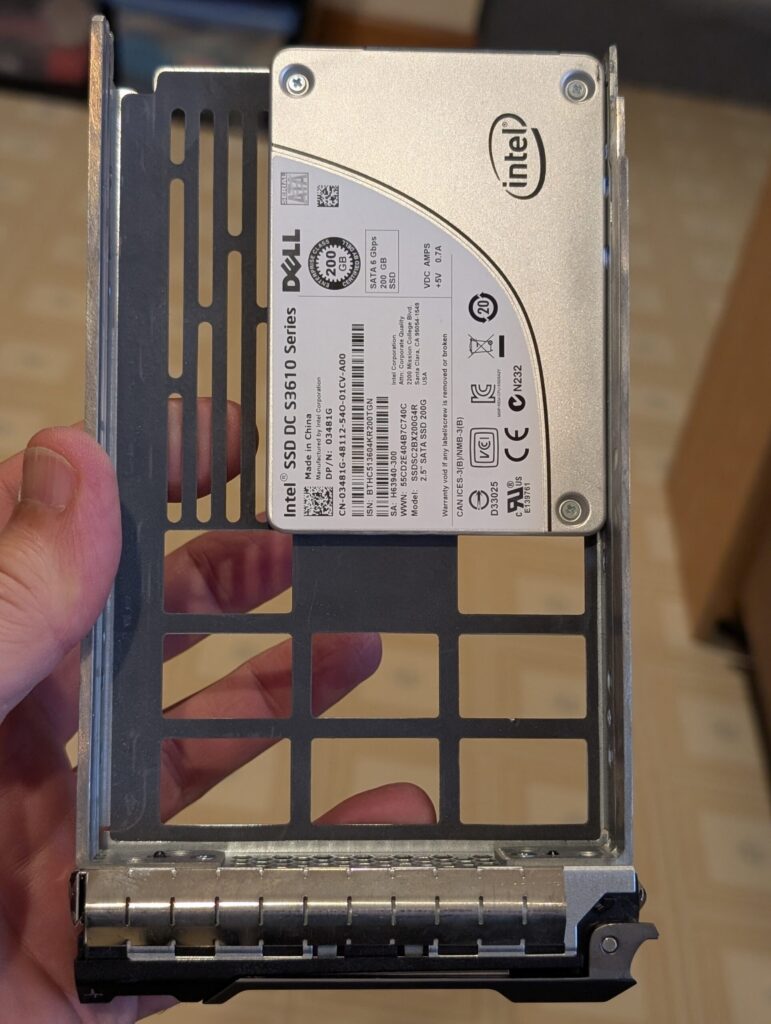
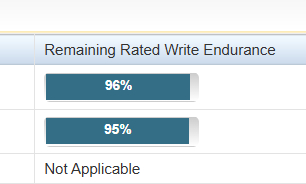
By modern standards, 200GB isn’t much storage, which makes these older enterprise SSDs inexpensive on the used market. But capacity isn’t what I need from a boot drive. The S3610 uses enterprise MLC NAND, includes power-loss protection, and was designed for substantially heavier write workloads than my Proxmox installation will ever generate. Despite being purchased used, the two drives currently report 96% and 95% of their rated write endurance remaining. For this job, I’d much rather have a small, inexpensive used enterprise SSD like this than a larger low-end consumer SSD for the same money.
Why I Keep Buying Them
Used enterprise drives aren’t the right answer for everyone. If I were building a desktop with a single hard drive holding irreplaceable data, my approach would obviously be different. But that’s not how my home lab is built.
My servers use redundant storage, the important data exists in more than one place, and I expect drives to eventually fail. In that environment, used enterprise drives have worked extremely well for me.
I’ve been buying them for years now. Some have failed. Others have accumulated extraordinary numbers of hours and just keep running. When one gives me a reason not to trust it, I replace it. Until then, I don’t particularly care whether it arrived new in a retail box or spent the first several years of its life in somebody else’s datacenter.
That’s really the whole philosophy. I’m not buying used enterprise drives because I think they’re indestructible. I’m buying them because they’re generally well-built, designed for the kind of workloads I’m giving them, and inexpensive enough that I can build redundancy around them rather than depending on any single drive.
And after years of doing it this way, I haven’t found much reason to change.
Hardware Mentioned in This Article
Some of the hardware in this article is older enterprise equipment that is no longer sold new. I’ve included the exact models where useful, along with current equivalents where appropriate.
- HGST Ultrastar enterprise hard drives — I’ve used numerous HGST SAS and SATA models from 4TB through 12TB over the years. HGST’s enterprise drive business is now part of Western Digital, and current Ultrastar enterprise drives are the modern equivalent.
- Intel DC S3610 200GB SATA SSD — The enterprise SSDs used for the mirrored Proxmox boot drives in one of my R720s. These are discontinued, but used examples are still readily available.
- Dell PowerEdge R720 — The servers currently housing many of these drives.
- Dell OptiPlex 7010 — Used as my local backup target with an externally attached 6TB HGST drive.
Leave a Reply